
Your Handheld Console Is Dirtier Than You Think
The best handheld console cleaner depends on what you’re tackling — screens, ports, buttons, or cartridge slots. Here’s a quick look at the top picks:
| Product | Best For | Key Feature |
|---|---|---|
| WHOOSH! Screen Cleaner Kit | Screens & touchscreens | Alcohol-free, ammonia-free formula |
| Weiman Disinfectant Wipes | Disinfecting surfaces | Kills 99.9% of germs in 4 minutes |
| Zeiss Mobile Screen Wipes | On-the-go cleaning | 120 individually wrapped wipes per pack |
| E-Cloth Microfiber Cloth | Everyday smudge removal | Warranted for 100 washes or 1 year |
| 1UPcard Cleaning Cartridge | Cartridge pin connectors | Fits Switch, GBA, DS, and retro systems |
| iFixit Game Console Cleaning Kit | Full console maintenance | Includes blower, brushes, swabs, and tweezers |
Think about how often your hands touch your Nintendo Switch or Steam Deck. Every session leaves behind oils, dust, and grime — and it builds up fast.
Dust doesn’t just look bad. It clogs vents, causes overheating, and can shorten the life of your device. Fingerprints smear screens. Debris creeps into ports and button gaps. Over time, neglect turns into real performance problems.
The good news? Keeping your handheld clean doesn’t take much time or money. The right tools and a simple routine can make a big difference.

Essential Supplies for Every Handheld Gamer
Before we dive into the specific products, we need to talk about the “Golden Rule” of tech hygiene: never use whatever is under the kitchen sink. Windex, bleach, and rough paper towels are the enemies of your Steam Deck’s anti-glare coating and your Switch’s plastic shell.
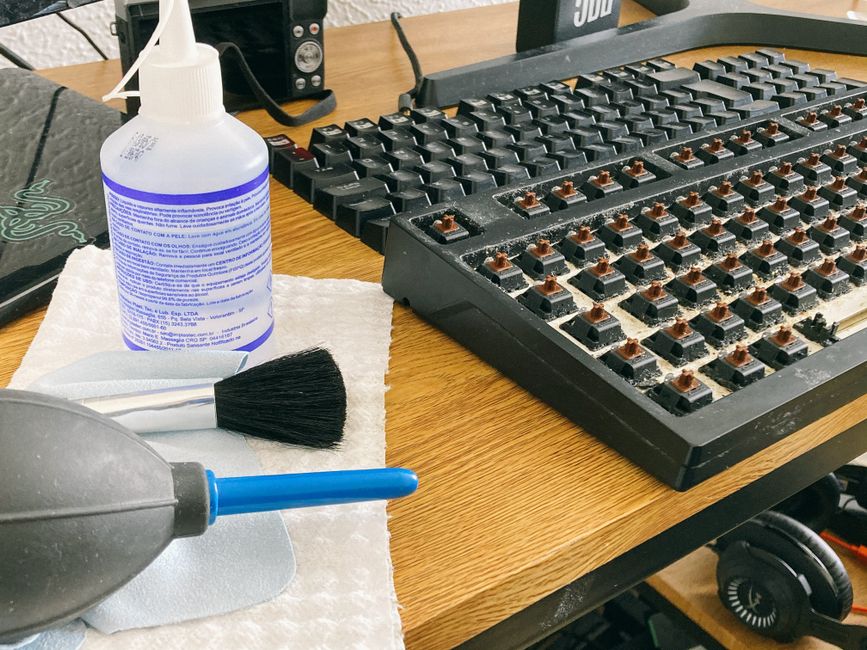
To build a professional-grade cleaning station at home, we recommend gathering these essentials:
- Microfiber Cloths: Not all cloths are created equal. You want high-quality, lint-free cloths (like the E-Cloth) that trap dust in microscopic fibers rather than just pushing it around.
- 99% Isopropyl Alcohol: This is the “holy grail” of electronics cleaning. Unlike 70% alcohol, which contains more water, 99% evaporates almost instantly, making it much safer for circuit boards.
- Soft-Bristled Toothbrushes: A brand-new, soft toothbrush is perfect for scrubbing “gamer gunk” out of button crevices and speaker grilles without scratching the plastic.
- Manual Air Blowers: Avoid the temptation to blow into your console with your mouth. Your breath contains moisture that can lead to corrosion. A manual rubber blower (like the one in the Game Console Cleaning Kit) provides a dry blast of air to clear ports.
- Cotton Swabs and Anti-Static Brushes: These allow you to reach deep into USB-C ports or between the fins of a cooling vent where dust likes to hide.
- Distilled Water: If you just need to wipe down a screen without chemicals, use a tiny drop of distilled water on a cloth. Tap water contains minerals that can leave streaks or scratches.
Top Rated Products for the Best Handheld Console Cleaner
When searching for the best handheld console cleaner, we look for products that balance effectiveness with safety. You want something that cuts through greasy fingerprints but won’t eat through the adhesive on your screen.
| Product Type | Top Recommendation | Why We Love It |
|---|---|---|
| Best Spray Kit | WHOOSH! Screen Shine | Apple-approved and used in their stores; non-toxic and odorless. |
| Best Travel Wipe | Zeiss Mobile Screen Wipes | Individually wrapped, 120-count pack is perfect for a travel bag. |
| Best Disinfectant | Weiman Wipes | Kills 99.9% of germs/bacteria if the surface stays wet for 4 minutes. |
| Best Dry Cloth | E-Cloth Microfiber | High-performance cleaning with just a tiny bit of moisture. |
Choosing the Best Handheld Console Cleaner for Screens
Modern handhelds like the Steam Deck and ROG Ally have beautiful, high-resolution screens that are magnet for oils. We’ve found that the best approach is a specialized spray like WHOOSH! This formula was developed by experts in biochemistry and is the only cleaner approved for use in Apple Stores worldwide. It’s free of ammonia and alcohol, which is vital because those chemicals can strip away the protective coatings on your touchscreen.
For a deeper dive into protecting your hardware, check out our handheld-console-maintenance-guide. The goal is to create a “nano-coating” on the screen that resists future smudges, making your next cleaning session even easier.
Why the Best Handheld Console Cleaner Includes Specialized Cartridge Tools
If you play physical games on the Nintendo Switch, DS, or Game Boy, the most common “hardware failure” is actually just a dirty pin connector. We’ve all been there: you pop in a game, and the console acts like nothing happened.
Instead of the old-school (and harmful) “blow on the cartridge” method, we recommend specialized tools like the 1UPcard™|Nintendo Switch Console Cleaning Cartridge|4Pack. These are shaped exactly like a game card but feature a felt-like pad designed to polish the internal pins and remove corrosion.
Whether you’re using a 1UPcard™ | Nintendo DS Video Game Console Cleaner | 2 pack or a Game Boy Console Cleaning Cartridge, these tools pull out “poopy brown” gunk you didn’t even know was there.
Deep Cleaning vs Routine Maintenance for Modern Systems
Maintenance isn’t a one-size-fits-all task. We categorize care into two buckets: routine wipes and the “deep clean.”
Routine Maintenance: This should happen after every few gaming sessions. Use a dry microfiber cloth to buff out fingerprints. If you’ve been snacking, use a manual air blower to clear any crumbs that fell near the analog sticks. This prevents “stick drift,” which is often caused by debris falling into the sensor housing.
Deep Cleaning: Every few months, your high-performance handhelds like the Steam Deck or ROG Ally need a vent inspection. These devices pull in a massive amount of air to stay cool. If dust clogs those vents, the system will “thermal throttle,” meaning your frame rate will drop to protect the chip from melting.
Use a soft brush and a vacuum (held at a safe distance) or an air blower to clear the intake and exhaust. For more tips on the right tools for this job, see our guide on retro-console-cleaning-tips-and-recommended-tools.
Protecting Delicate Electronics and Retro Hardware
If you’re a collector of vintage handhelds, the stakes are higher. Consoles made before 2000 often used low-quality capacitors that are prone to leaking after 30 years. These “little cylinders of death” can leak corrosive fluid onto the circuit board, eating through traces and destroying the system.
When cleaning a classic Game Boy or Game Gear, we recommend:
- Inspection: Look for yellowish-brown residue or a “crust” on the board.
- Circuit Board Cleaning: Use 99% isopropyl alcohol and a soft toothbrush. Apply minimal pressure.
- Label Care: Be incredibly careful around stickers. If you get alcohol under the edge of a label, it will peel. Use a cotton swab to clean around the edges only.
- The Retr0bright Process: If your old handheld has turned yellow from sun exposure, you can actually reverse this using a hydrogen peroxide solution and UV light—but only after the console is fully cleaned and disassembled.
Frequently Asked Questions about Handheld Cleaning
How often should I clean my handheld console?
We recommend a quick screen wipe daily or after every long session to prevent oil buildup. A more thorough cleaning of the ports and vents should happen once a month. If you’re a heavy traveler, you might want to use a disinfectant wipe like Weiman’s weekly to kill germs picked up on planes or trains.
Is Windex safe for Nintendo Switch or Steam Deck screens?
Absolutely not. Windex and other household glass cleaners contain ammonia. Ammonia can cloud the plastic screen of a standard Switch and permanently damage the anti-reflective coatings on a Steam Deck or ROG Ally. Stick to alcohol-free screen sprays or a damp microfiber cloth.
How do I clean dust from internal fans without disassembly?
For modern systems, use a manual air blower or a can of compressed air. Important Tip: When using compressed air, use short bursts and try to prevent the fan from spinning freely at high speeds, as this can actually generate a small electrical charge that might damage the board. If the dust is really caked on, a professional cleaning kit from iFixit is your best bet.
Conclusion
At FinanceDataX, we believe that tech hygiene is the secret to a long-lasting gaming setup. Whether you’re restoring a dusty find from your parents’ basement or keeping your brand-new Steam Deck in peak condition, using the best handheld console cleaner is an investment in your hobby.
Regular maintenance doesn’t just make your games look better on a smudge-free screen; it protects the internal hardware from the heat and corrosion that lead to “hardware death.” Grab a WHOOSH! kit, some 99% alcohol, and a few 1UPcards, and you’ll be set for years of gaming.
