
The Best PlayStation Emulators Right Now (Quick Answer)
The best playstation emulator for most people in 2025 is DuckStation — it’s fast, accurate, actively maintained, and works on Windows, Linux, macOS, and Android. Here’s a quick breakdown:
| Emulator | Best For | Platforms |
|---|---|---|
| DuckStation | Most users (modern PC/Android) | Windows, Linux, macOS, Android |
| RetroArch (Beetle PSX) | Power users & handhelds | Windows, Linux, macOS, Android, iOS |
| PCSX-ReARMED | ARM-based handhelds | Linux, Android, Raspberry Pi |
| ePSXe | Older PCs (Windows 7) | Windows, Android |
| Gamma | iPhone/iPad users | iOS |
Remember spending hours on Tony Hawk’s Pro Skater or watching that iconic PlayStation startup screen boot up? You don’t need the original hardware to relive those moments.
PS1 emulation has come a long way. What used to require obscure plugins and hours of tinkering now takes about five minutes to set up — and modern emulators can actually make those old games look better than they did on the original console.
But with several emulators out there, picking the right one matters. The wrong choice can mean choppy framerates, broken audio, or games that simply won’t launch.
This guide cuts through the noise. Whether you’re gaming on a modern Windows PC, an Android phone, an iPhone, or a retro handheld — there’s a right tool for the job.

The Best PlayStation Emulator for Modern PCs: DuckStation
If you ask the retro gaming community today what the “Greatest of All Time” is for the original PlayStation, the answer is almost always DuckStation: Fast PS1 Emulator. Developed by Stenzek, this emulator has completely changed the landscape of 32-bit gaming.
DuckStation is an all-in-one powerhouse that focuses on three main pillars: playability, speed, and long-term maintainability. While older emulators relied on a “plugin” system that often broke or required constant tweaking, DuckStation comes with everything baked in. It aims to be as accurate as possible while remaining performant enough to run on what we like to call “potato-tier” hardware.
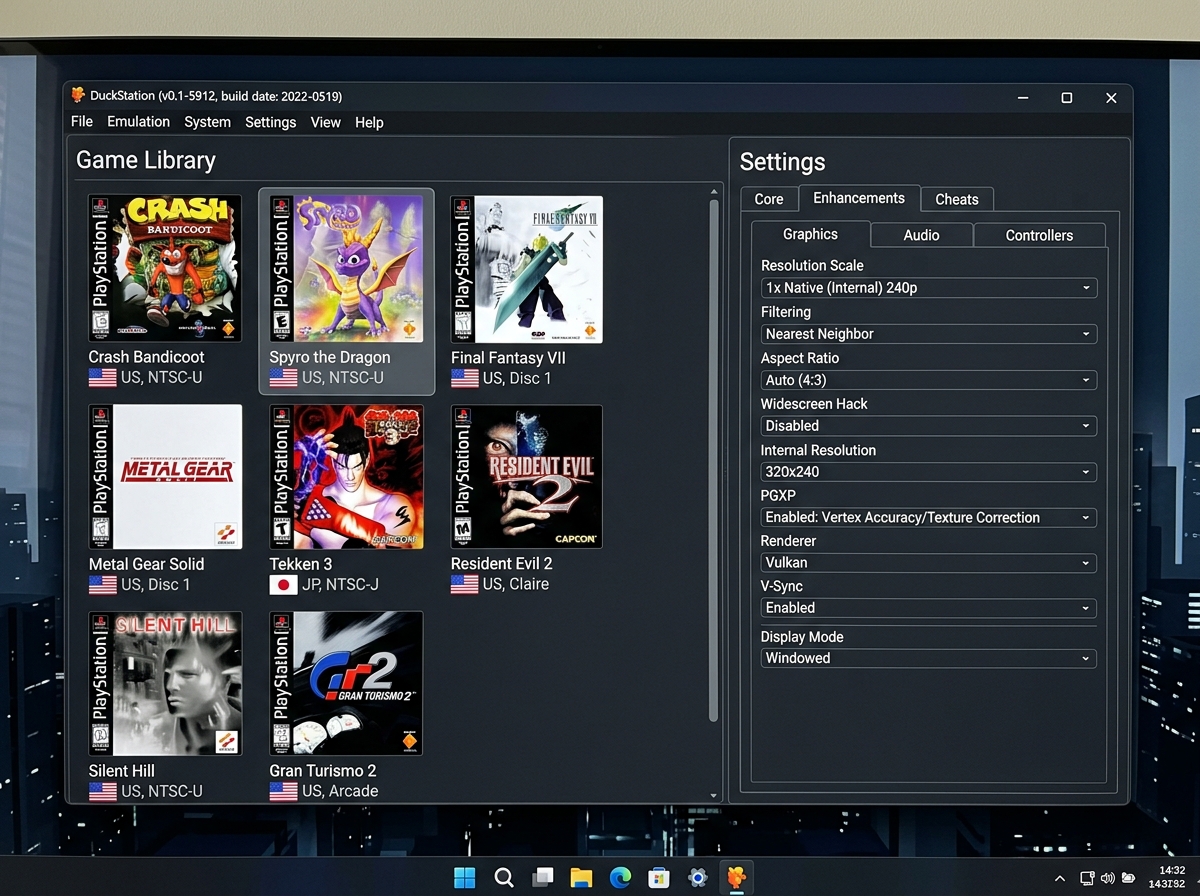
For those of us using modern rigs, DuckStation allows us to push these classic games to their absolute limits. You can upscale resolution to 4K, making blocky textures look sharp and clean. It also features PGXP (Parallel Geometry Xform Pipeline). If you remember how textures used to “wobble” or “jitter” on the original PS1 hardware, PGXP is the cure. It corrects the precision of the 3D coordinates, resulting in a rock-steady image that looks more like a modern remaster than a 30-year-old game.
Setting up your controls is also a breeze. We recommend mapping your controller to a retro emulator early on to ensure your analog sticks and vibration (rumble) work exactly like the original DualShock.
Why DuckStation is the Community Favorite
Why did DuckStation dethrone the giants? For starters, it supports modern graphics APIs like Vulkan, DirectX 11, DirectX 12, and Metal. This means whether you are on a high-end gaming PC or a MacBook, you’ll get smooth performance.
The community also loves the integration of RetroAchievements. There is something incredibly satisfying about “pinging” an achievement for beating a boss in Final Fantasy VII decades after the game was released. Furthermore, the GitHub – stenzek/duckstation: Fast PlayStation 1 emulator page shows a project with over 11,000 commits, proving that this isn’t “abandonware”—it’s a living, breathing project.
According to Best PS1 emulator? :: Steam Community, users prefer it because it “just works.” You don’t have to be a software engineer to get Metal Gear Solid running at 60 FPS.
Advanced Features for Power Users
For those of us who like to tinker, DuckStation offers a deep well of features:
- Texture Replacement: You can actually load custom high-definition textures into old games.
- Post-Processing: Use Reshade FX or GLSL shaders to add scanlines or CRT filters for that authentic “90s TV” look.
- CPU Overclocking: You can “overclock” the emulated PS1 CPU to eliminate the slowdown that occurred in the original hardware during intense scenes.
- Save States: Never worry about finding a save point again. We have a great using save states in emulators a how to guide if you want to master this “time-traveling” feature.
Top Alternatives for Handhelds and Legacy Hardware
While DuckStation is the king of the desktop, it might not be the best playstation emulator for every single device. If you’re using a dedicated retro handheld (like an Anbernic or Retroid device) or an older laptop, you might need something lighter.
| Feature | DuckStation | ePSXe | RetroArch (Beetle) |
|---|---|---|---|
| Accuracy | High | Medium | Very High |
| Ease of Use | High | Low (Plugins) | Medium (Learning Curve) |
| Hardware Req. | Low-Mid | Very Low | Mid-High |
| Active Dev | Yes | No | Yes |
For ARM-based devices (like the Raspberry Pi), PCSX-ReARMED is often the go-to. It is highly optimized for these specific processors, ensuring you get full speed even on low-power chips. If you find your games are lagging, check out our guide on troubleshooting slow games in retro emulators or our tips for optimizing your retro emulator for improved performance.
RetroArch and the Power of Cores
If you want one app to rule them all, RetroArch is the answer. It isn’t an emulator itself, but a “frontend” that loads different “cores.” For PS1, you have two heavy hitters:
- Beetle PSX HW: This is widely considered the most accurate PS1 emulator in existence. It requires a bit more “oomph” from your CPU, but it replicates the original hardware’s behavior almost perfectly.
- SwanStation: A fork of DuckStation designed specifically to run within the RetroArch ecosystem.
If you are new to this, we suggest starting with our beginners guide to setting up a retro emulator to understand how the RetroArch interface works.
ePSXe: The Legacy Choice for Older PCs
We can’t talk about PS1 emulation without mentioning Welcome to the official ePSXe website. For over a decade, this was the gold standard. While its last major update was way back in 2008 (version 1.7.0), it still has a place in the heart of the community.
As noted in a Hello gamers fellas! Community Discussion, ePSXe is the “old reliable” for people running Windows 7 or older hardware. It uses a plugin system for video and audio, which can be a bit “buggy” by modern standards, but it’s incredibly lightweight. If your PC is fifteen years old, ePSXe might be your best bet.
Mobile Gaming: Best Options for Android and iOS
The dream of playing Final Fantasy VII on the bus is now a reality. Mobile devices have become so powerful that they can easily handle PS1 games with high-resolution upscaling.
High-Performance PS1 Emulation on Android
Android users are spoiled for choice. DuckStation has an official Android port with over 1 million downloads and a solid 4.2-star rating. It supports Vulkan rendering and 64-bit architecture, which is essential for modern smartphones. If you’re looking for the absolute best performance, you’ll want to dive into the best settings for psp emulation and apply similar logic to your PS1 setup—focusing on GPU rendering and frame skipping only if necessary.
Gamma: Bringing PlayStation to the Apple Ecosystem
For a long time, iOS users were left out in the cold due to Apple’s strict App Store policies. That changed recently with the arrival of Gamma. Gamma features a UI very similar to the popular Delta emulator, making it familiar for iPhone gamers.
It holds a 4.7-star rating and makes it easy to load games (usually in .bin format). While the free version has ads, there is a $5 pro version that offers an ad-free experience. If you’re trying to get the best out of your Mac or PC as well, check out our tips for achieving optimal settings for psp emulation on pc.
Beyond PS1: The Best PlayStation Emulator Options for PS2, PS3, and PS4
Once you’ve conquered the 32-bit era, you might find yourself looking toward the 128-bit generation and beyond. Emulating these consoles is significantly more difficult, but the technology is catching up fast.
Finding the Best PlayStation Emulator for PS2: PCSX2
When it comes to the PlayStation 2, there is only one name you need to know: is an open source PS2 Emulator. PCSX2 has been in development for nearly 20 years and supports over 2,600 games (about 99% of the library).
It uses MIPS recompilers and a virtual machine to mimic the PS2’s complex “Emotion Engine” CPU. Like DuckStation, it allows for custom resolutions and upscaling. Playing God of War II in 4K is a transformative experience. If you’re debating between using the original hardware or an emulator, our emulation vs original console guide can help you decide.
The Best PlayStation Emulator for PS3 and PS4 Progress
The PS3 era is handled brilliantly by The Open-source PlayStation 3 Emulator, known as RPCS3. It’s a multi-platform emulator that has even been seen running on the Steam Deck and Raspberry Pi 5!
As for the PS4, we are still in the “experimental” phase. Projects like RPCSX – PS4 Emulator are making progress, successfully booting smaller titles like Sonic Mania. You might see sites like Download PCSX4 – PS4 Emulator claiming to have full compatibility, but be cautious—PS4 emulation is still very much a work in progress, and “Bloodborne at 60 FPS” is the holy grail everyone is still chasing.
Setup Guide: BIOS, Legalities, and Optimization
Before you can start playing, there is one “missing piece” you need: the BIOS. The BIOS (Basic Input/Output System) is the copyrighted software that tells the PlayStation how to boot.
How to Legally Obtain and Install a PS1 BIOS
For legal reasons, emulators do not come with BIOS files. To stay on the right side of the law, you should dump the BIOS from your own physical PlayStation console. Tools like Caetla or Unirom can help you do this.
Once you have your BIOS file (usually named something like scph5501.bin), you need to place it in the emulator’s “BIOS” directory.
- Windows: Usually in
Documents/DuckStation/bios. - Android: You will need to select the folder manually within the app.
Don’t forget about LibCrypt. Some European (PAL) games used this protection, which requires an additional SBI file to run. Simply name the SBI file the same as your game (e.g., Crash.bin and Crash.sbi) and place them in the same folder. For a full walkthrough, see our guide to installing a retro emulator on pc.
Frequently Asked Questions about PlayStation Emulators
Which emulator is best for low-end PCs?
If you have a very old computer (Windows 7 era), ePSXe is your best bet. If your PC is from the last 10 years, DuckStation is actually very efficient and will likely run better than older options.
How do I fix wobbly textures in PS1 games?
This is caused by the PS1’s lack of floating-point math. To fix it, use an emulator that supports PGXP (like DuckStation or Beetle PSX HW) and enable “Geometry Correction” in the GPU settings.
Is it legal to use a PlayStation emulator?
Emulators themselves are 100% legal. However, downloading “ROMs” (game files) or BIOS images from the internet is generally considered copyright infringement. The legal way to play is to dump the files from the discs and consoles you personally own.
Conclusion
At FinanceDataX, we love seeing how technology keeps gaming history alive. Whether you’re a purist who wants the pixel-perfect accuracy of Beetle PSX or a modern gamer who wants the 4K glory of DuckStation, there has never been a better time to be a fan of the 32-bit era.
Choosing the best playstation emulator comes down to your hardware. For 90% of users, DuckStation is the undisputed GOAT. It’s fast, it’s beautiful, and it’s free. Now that you have the tools, it’s time to stop reading and start playing!
For more guides on hardware and classic titles, check out our category game emulation page for the latest trends and maintenance tips.
